
Trading
General Data Requirements
Before preparing your data tables, please review the following universal formatting rules.
The below represents Optimove's required data schema. If you are unable to provide your data in the requested schema, you will be requested to supply a clear mapping from your schema to the Optimove standard schema as part of the onboarding process. This ensures a smooth data integration and avoids delays.
Data Formatting
- Decimal Precision: All decimal-type attributes must be rounded to a maximum of four decimal places. For example, a value of
4.56789must be formatted as4.5679. This applies to all monetary fields and other decimal values. - Currency Conversion: All monetary figures must be converted into a single, consistent currency across all tables.
Required Data Tables
The following data tables describe the content, format and labels of the required data.
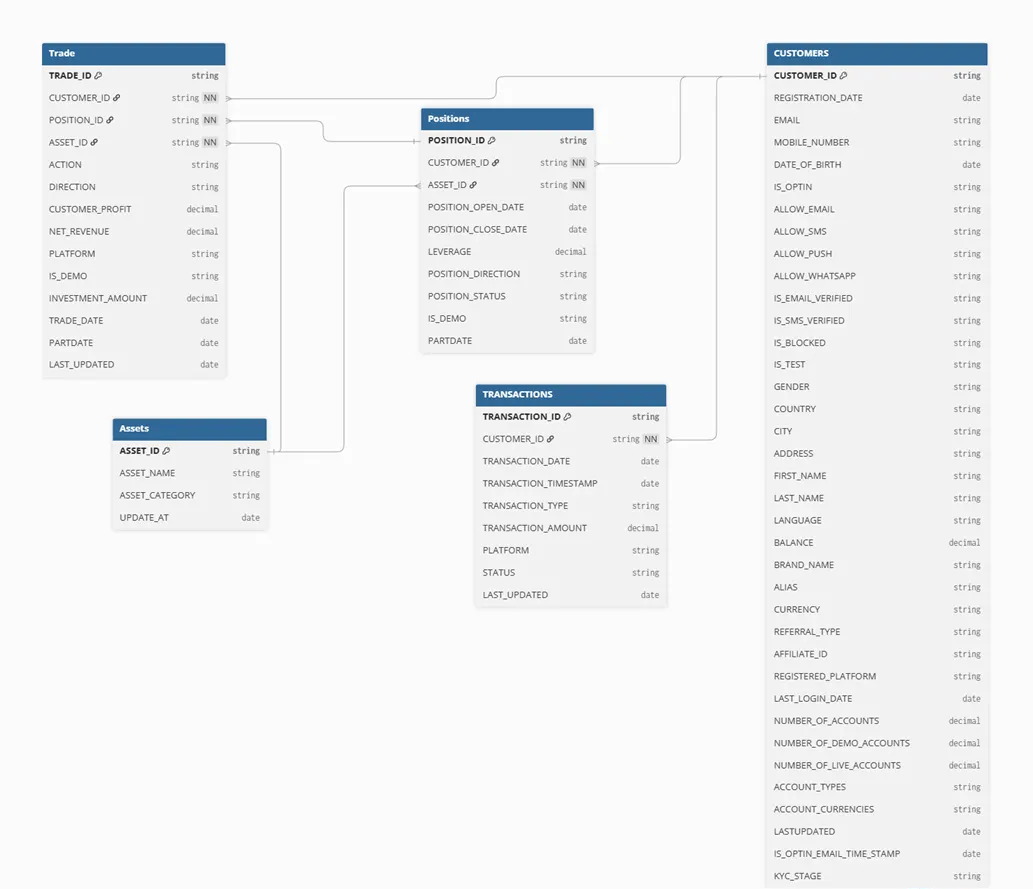
- Customers – Each row describes the attributes of a single customer
- Assets – Assets IDs and their associated textual names and category
- Trade – Each row describes trading activity made by the customer
- Positions – Each row describes a single position
- Transactions – Each row describes a financial transaction
Customers
| Key | Key Field | Data Type | Description |
|---|---|---|---|
| PK | Customer_ID** | String/Int | Unique customer identifier |
| Registration_Date** | Date | Date the customer registered | |
| Email* | String | Mandatory when using Email or if required by external ESP | |
| Mobile_Number* | String | Mandatory if required by external service provider | |
| Date_Of_Birth | Date | Customer’s date of birth | |
| Is_OptIn | String | Determines whether it is acceptable to send promotional messages to the specified player. Should hold the values 'Yes' or 'No'. | |
| Allow_Email* | String | Determines whether it is acceptable to send promotional Email messages to the specified email address. Should hold the values 'Yes' or 'No'. | |
| Allow_SMS* | String | Determines whether it is acceptable to send promotional SMS messages to the specified mobile address. Should hold the values 'Yes' or 'No'. | |
| Allow_Push* | String | Determines whether it is acceptable to send promotional Push messages to the specified mobile number. Should hold the values 'Yes' or 'No'. | |
| Is_Email_Verified | String | Determines whether the email address is verified. Should hold the values 'Yes' or 'No'. | |
| Is_SMS_Verified | String | Determines whether the mobile number is verified. Should hold the values 'Yes' or 'No'. | |
| Is_Blocked | String | 'No’ = regular customer; 'Yes’ = blocked customer (e.g. fraud) | |
| Is_Test | String | 'No’ = regular customer; 'Yes’ = test customer | |
| Gender | String | Customer’s gender. Must hold values ‘Male’, ‘Female’, ‘Unknown’ | |
| Country | String | Customer’s country | |
| City | String | Customer’s city | |
| Address | String | Customer’s address | |
| First_Name | String | Customer’s first name | |
| Last_Name | String | Customer’s last name | |
| Language | String | Customer’s language | |
| Balance | Decimal/Int | Total aggregated balance across all related customer accounts | |
| Brand_Name | String | When multiple brand platforms exist | |
| Number_of_Accounts | Int | Total number of accounts associated with the customer | |
| Number_of_Demo_Accounts | Int | Number of demo (training) accounts linked to the customer. | |
| Number_of_Live_Accounts | Int | Number of real (live trading) accounts linked to the customer. | |
| Account_Types | String | Account types associated with the customer, defined as a semicolon-separated string (e.g., CFD;Forex;Crypto) | |
| Account_Currencies | String | Account currencies associated with the customer, stored as a semicolon-separated string (e.g., USD;EUR) | |
| KYC_stage | String | KYC stage of the customer | |
| Alias | String | User name | |
| Currency | String | Customer’s currency | |
| Referral_Type | String | The method the player was referred to your site (e.g. SEO, Affiliate, Advertising, Marketing, etc.) | |
| Affiliate_ID | String | Affiliate identifier or name | |
| Registered_Platform | String | The platform the customer had registered with (e.g. Web, Android App, iOS App, etc.) | |
| Last_Login_Date | Date | The date of the customer’s last login to the website | |
| Allow_Whatsapp | String | Determines whether it is acceptable to send promotional WhatsApp messages to the specified mobile number. Should hold the values 'Yes' or 'No'. | |
| LastUpdated | Date | Date when the record was last modified or added (Mandatory in case of DB to DB connection) | |
| Is_Optin_Email_Time_Stamp* | Timestamp | Determines the timestamp of the latest opt-in/out status change, whether to consent or non-consent, indicating from when promotional email messages may or may not be sent to the specified email address. |
Notes:
- IsOptinEmailTimeStamp* - In case Optimove will manage the “unsubscribe” for the Opti-Mail integration please include additional column to describe when the customer opts in \ out, in order to allow perfect sync with the daily batch.
- *=Mandatory if required for the execution channel integration
- **=Always mandatory
Assets
| Key | Key Field | Data Type | Description |
|---|---|---|---|
| PK | Asset_ID** | String | Unique asset identifier |
| Asset_Name | String | Asset name | |
| Asset_Category | String | Asset category (e.g. Currencies, Indices, Commodities, etc.) | |
| Update_At | Date | Date when the record was last modified or added (including status changes) |
Note:
- **=Always mandatory
Positions
| Key | Key Field | Data Type | Description |
|---|---|---|---|
| PK | Position_ID** | String | Unique position identifier |
| Customer_ID** | String | Unique customer identifier | |
| FK | Asset_ID | String | Unique asset identifier |
| Position_Open_Date | Date | Position open time | |
| Position_Close_Date | Date | Position close time | |
| Position_Status | String | Indication of position status (e.g. Open, Closed) | |
| Is_Demo | String | Indicates whether the trade was executed in a demo (training) environment or a live account. Should hold the values 'Yes' or 'No' | |
| Leverage | Decimal | Customer Leverage. Shouldn’t be negative. |
Note:
- **=Always mandatory
Trade
| Key | Key Field | Data Type | Description |
|---|---|---|---|
| PK | Trade_ID** | String | Unique trade (transaction) identifier. Each record represents a single trade event |
| Customer_ID** | String | Unique customer identifier associated with the trade. | |
| FK | Asset_ID | String | Unique asset identifier |
| Action | String | Type of trade action performed (e.g., Open, Increase, Close) | |
| Direction | String | Trade direction | |
| Customer_Profit | Decimal | Profit or loss realized from this specific trade | |
| Net_Revenue** | Decimal | Net revenue generated by the customer from this trade. Usually calculated as: Spread + Commission + Swap Revenue – Bonuses – Adjustments | |
| Platform | String | The platform used to open the position. Should hold ‘Web’, ‘Mobile’ | |
| FK | Position_ID** | String | Unique identifier linking this trade to the related position |
| Is_Demo | String | Indicates whether the trade was executed in a demo (training) environment or a live account. | |
| Investment_Amount** | Decimal | The notional amount or value (in USD or account currency) involved in this trade. | |
| Trade_date** | Date | The date when the trade was made | |
| Last_Updated | Date | Date when the record was last modified or added (Mandatory in case of DB to DB connection) |
Note:
- **=Always mandatory
Transactions
| Key | Key Field | Data Type | Description |
|---|---|---|---|
| PK | Transaction_ID** | String/Int | Unique transaction identifier |
| FK | Customer_ID** | String | Unique customer identifier |
| Transaction_Date** | Date | Transaction date | |
| Transaction_Timestamp | Timestamp | Transaction Timestamp | |
| Transaction_Type** | String | Transaction type. Should hold values 'DEPOSIT', 'WITHDRAWAL', or 'BONUS' | |
| Transaction_Amount** | Decimal | Monetary value of the transaction. | |
| Platform | String | Platform from which the transaction made (e.g. Web, Mobile, Download) | |
| Status** | String | Transaction status (e.g. Approved, Rejected, Pending). Must have status ‘Approved’ for approved transactions. | |
| Last_Updated | Date | Date when the record was last modified or added (Mandatory in case of DB to DB connection) |
Note:
- Any other transaction dimension available can be added if needed.
- **=Always mandatory
Database Schema
Batch-Data Process
Once Optimove successfully receives all historical data, a batch-data update process is required to ensure that Optimove’s data warehouse is updated every day, with the latest available data.
This data extraction process is similar to the method used for the initial historical data delivery, but will include only incremental (new/changed) data.
For additional details about the batch-data process, see Batch data process.
Ensuring Data Integrity
The following points will help ensure the integrity of the data you provide to Optimove:
- The primary keys (unique identifiers) that were initially defined for each table must remain present and consistent in files delivered daily, without Null values. Please avoid duplications on the primary key level.
- When providing historical data, ensure that data for the entire date range is provided. If this is not possible, inform Optimove in advance of any dates missing from the date ranges provided in each table.
- It is important that all identifiers in all transactional tables exist in the relevant DIM table. For example, all game IDs in the Games table must appear in the Game Types and Categories table, or all product IDs in the Orders table must appear in the Catalog table.
- It is important that all customer IDs that appear in the transactional and fact tables also appear in the Customers table. Only customer IDs appearing in the Customers table will be included in Optimove.
- Every change made to the data schema must be brought to Optimove’s attention in advance. Uncoordinated schema changes will cause the batch-data process to fail.
- Do not include any retroactive data (older than initially agreed upon) in the batch-data tables. If you feel it is necessary to do so, coordinate with Optimove in advance.
- Do not use any default dates such as ‘1900-01-01,’ instead please use Null (blank in files) as default.
For further explanation see Data QA Processes.
Questions?
We are here to help! Please contact us with any questions, and we will be happy to assist you. Email us at [email protected] or call us (seven days a week from 5:00 am to 8:00 pm GMT) at +972-3-672-4546.
Updated 3 months ago