
Advanced Control Flow
This guide explains the Advanced Control Flow, which works for both scheduled and triggered campaigns. This model gives your system full flexibility to embed its own custom business logic -including customer filtering (scrubbing) and control over each step of the execution process.
This flow is designed for full eligibility workflows where you need to orchestrate validation and reward delivery in response to direct customer actions or your own internal criteria.
When to Use Advanced Control Flow
Choose this flow when:
- You need to apply custom business logic to filter or scrub the customer list before rewards are activated
- You want direct control over the timing of validation and reward delivery
- You require advanced reporting or custom metrics based on your own activation logic
- You are triggering reward validation in response to specific customer actions on your platform
Use cases include:
- Customer filtering with business logic -Apply eligibility rules that go beyond Optimove's standard targeting, such as suppressing customers based on real-time data
- Scrubbing and time control -Remove ineligible customers from the list and control exactly when rewards are delivered
- Trigger validation for specific customer actions -Validate a customer only when they complete a defined action (e.g., a deposit or purchase)
- Advanced reporting and custom metrics -Capture activation data at each step for use in your own analytics and reporting pipelines
Key Capabilities
- Full control over execution -Define exactly when and how validation and reward delivery occur
- Custom filtering (scrubbing) -Apply your own business logic to precisely target eligible customers
Prerequisite: Register a Webhook Listener (One-Time Setup)
Before you can use this flow, your system must be able to receive notifications from Optimove. This requires registering an endpoint (a webhook listener) that you control. This is a one-time setup.
- For scheduled campaigns, use the
RegisterEventListenerAPI withEventTypeID: 5. - For triggered campaigns, use the
POST /conditional-execution/v2/triggered/webhooks/endpoint.
The Activation Flow
The flow begins with a webhook from Optimove to your system. Your system then drives all subsequent steps -retrieving the customer list (scheduled campaigns only), calculating rewards through Promotions (formerly OptiPromo), activating rewards on your platform, and confirming execution back to Optimove.
The steps vary slightly depending on campaign type. Select the flow for your campaign type below.
Jump to: Scheduled Campaign Execution | Triggered Campaign Execution
Scheduled Campaign Execution
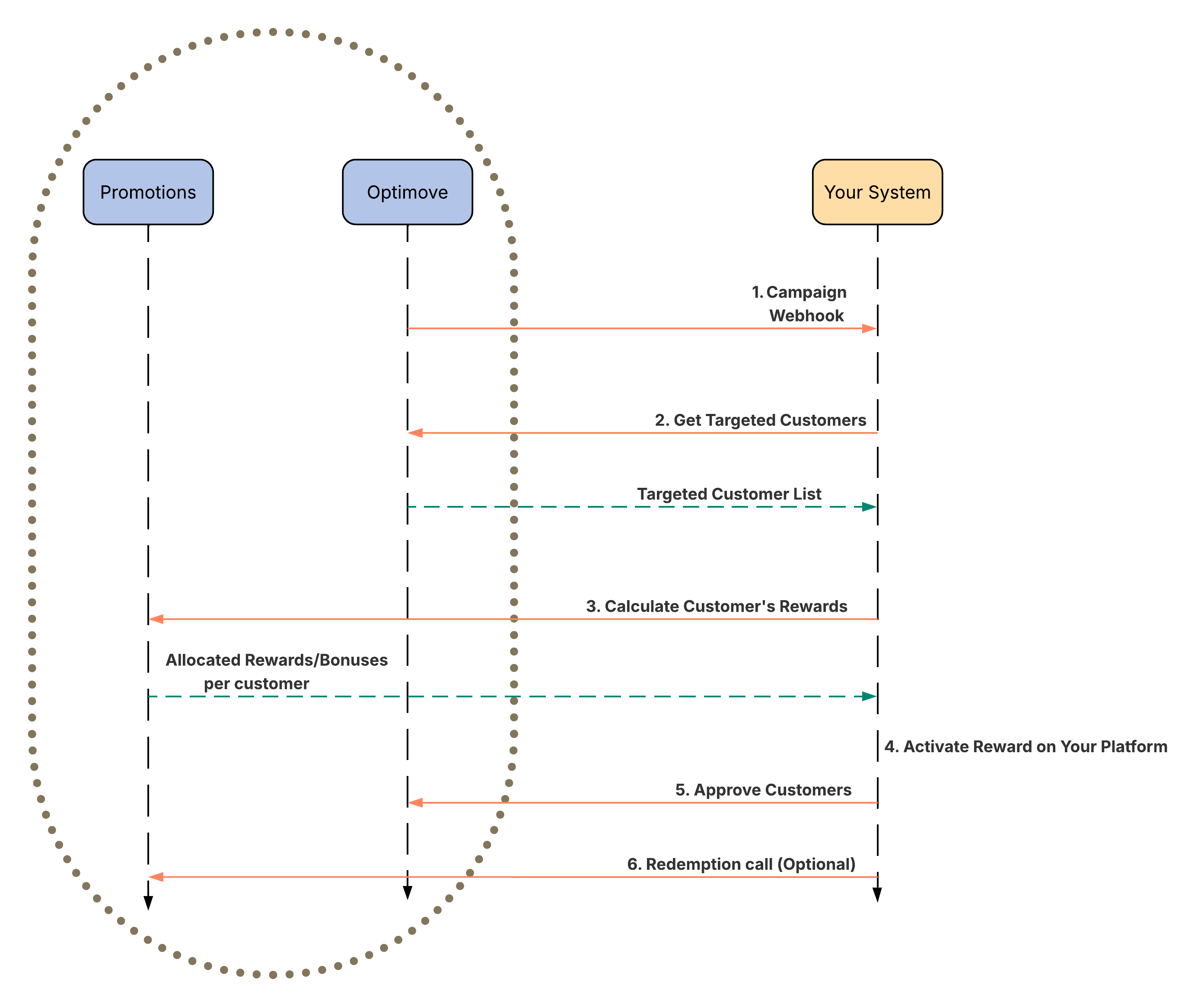
1. Campaign Webhook
What happens: Optimove executes the campaign and sends a webhook notification to your registered endpoint to signal that the campaign has started.
Why it's important: This webhook is the starting signal for the entire process, informing your system that a new promotion is active and customers have been targeted.
2. Get Targeted Customers
What happens: Upon receiving the webhook, your system makes an API call to Optimove (Get Campaign Customers) to retrieve the full list of targeted customers.
Why it's important: This step gives your system the specific audience for the promotion. At this stage, you can apply your own preliminary business logic, such as:
- Scrubbing the customer list based on internal eligibility rules
- Segmenting customers for different reward tiers or experiences
- Filtering based on real-time data not available in Optimove
3. Calculate Customer's Rewards
What happens: Your system calls the Promotions validateCustomers API for each customer to determine their reward. Promotions evaluates:
- Eligibility based on promotion rules
- Budget and audience cap availability
- Reward tier calculation
Promotions returns the allocated rewards and bonuses per customer.
Why it's important: This real-time check confirms each customer's eligibility and calculates their exact reward entitlement based on the campaign's promotion logic.
4. Activate Reward on Your Platform
What happens: After receiving the reward allocation from Promotions, your system activates the reward for each eligible customer. This process occurs entirely within your own environment.
Why it's important: This is the moment the customer actually receives their reward. Examples include crediting bonus funds to a wallet, adding free spins to a gaming account, or applying a discount to a cart. You can also apply any final post-allocation logic at this point.
5. Approve Customers
What happens: After your system successfully activates each reward, it makes a final API call to Optimove to confirm which customers were approved and processed.
Why it's important: This closing call is critical. It informs Optimove that rewards have been successfully delivered, which:
- Prevents the same customer from receiving the reward twice
- Ensures accurate campaign reporting
- Keeps the promotion budget up to date
6. Call the Redemption Endpoint (Optional)
What happens: Send a reward activation report to Promotions so redemption can be tracked. This can be reported in two ways:
- Triggered -Send an individual API request to Promotions for each reward activation
- Scheduled -Send a batch of reward activations at a set interval
See the Redemption endpoint for details.
Triggered Campaign Execution
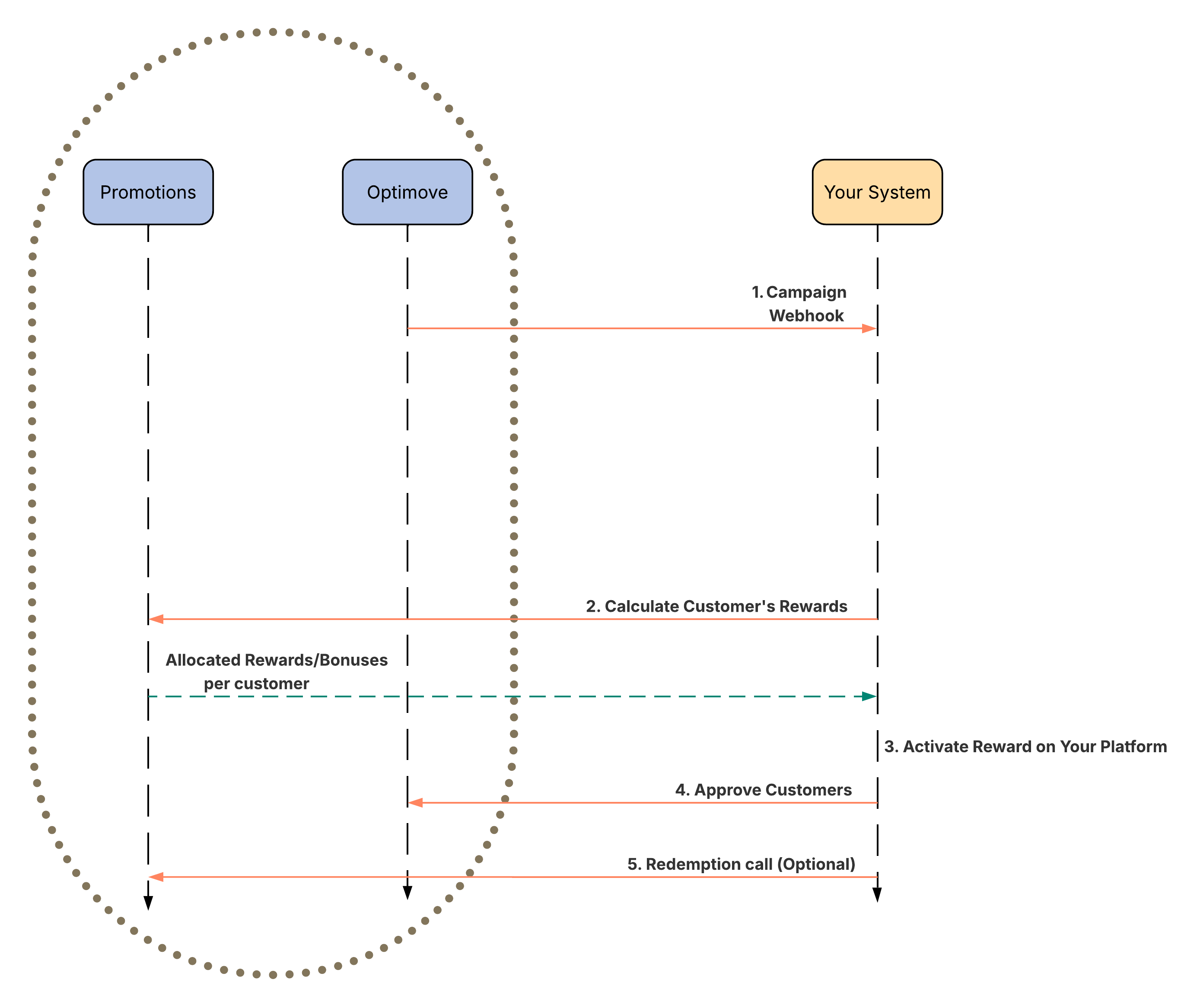
1. Campaign Webhook
What happens: Optimove sends a webhook notification to your registered endpoint when the triggered campaign fires for a customer event.
Why it's important: This webhook signals that a customer has met the trigger conditions for the campaign and is ready for reward validation.
2. Calculate Customer's Rewards
What happens: This step is initiated by a customer's action on your website or app (e.g., completing a deposit or purchase). In response, your system calls the Promotions validateCustomers API. Promotions evaluates:
- Eligibility based on promotion rules
- Budget and audience cap availability
- Reward tier calculation
Promotions returns the allocated rewards and bonuses per customer.
Why it's important: This real-time check confirms eligibility and calculates the exact reward at the moment the customer takes action, ensuring accuracy and preventing duplicate or invalid reward delivery.
3. Activate Reward on Your Platform
What happens: After receiving the reward allocation from Promotions, your system activates the reward for the customer. This process occurs entirely within your own environment.
Why it's important: This is the moment the customer actually receives their reward. You can also apply any final post-allocation logic at this point.
4. Approve Customers
What happens: After your system successfully activates the reward, it makes a final API call to Optimove to confirm the customer was approved and processed.
Why it's important: This closing call informs Optimove that the reward has been successfully delivered, prevents duplicate reward delivery, and keeps campaign reporting and budget tracking accurate.
5. Call the Redemption Endpoint (Optional)
What happens: Send a reward activation report to Promotions so redemption can be tracked. This can be reported in two ways:
- Triggered -Send an individual API request to Promotions for each reward activation
- Scheduled -Send a batch of reward activations at a set interval
See the Redemption endpoint for details.
What Promotions Still Handles
Even in this flow, Promotions' promotion engine automatically handles the core business logic during the Calculate Customer's Rewards step, including:
- Promotion rule enforcement
- Reward tier assignment
- Budget enforcement
API Reference
Your system will need to make the following calls to implement this flow.
Looking for a simpler approach? If you don't need custom filtering or execution control, see the Auto Flow guide for the fully automated integration option.
Updated 3 months ago