
SMS API
Overview
The SMS API (formerly OptiText API) lets a third-party SMS provider connect to Optimove's SMS (formerly OptiText) channel through one standardized integration, rather than relying on a dedicated connector built for each provider.
This means a tenant can send SMS through any provider that supports the SMS API, including local operators and niche providers that don't already have an Optimove connector. Once integrated, your service acts as the execution channel for SMS campaigns orchestrated by Optimove, using a bi-directional flow to handle campaign transmission, delivery reporting, and incoming customer messages.
The integration is built from four flows:
- Configuration — set up credentials in the Optimove UI.
- Handshake — establish the authenticated connection (this replaces traditional webhook registration).
- Campaign Transmission — receive campaign batches from Optimove.
- Delivery & Incoming Reporting — send delivery status updates and customer replies back to Optimove.
Integration Architecture
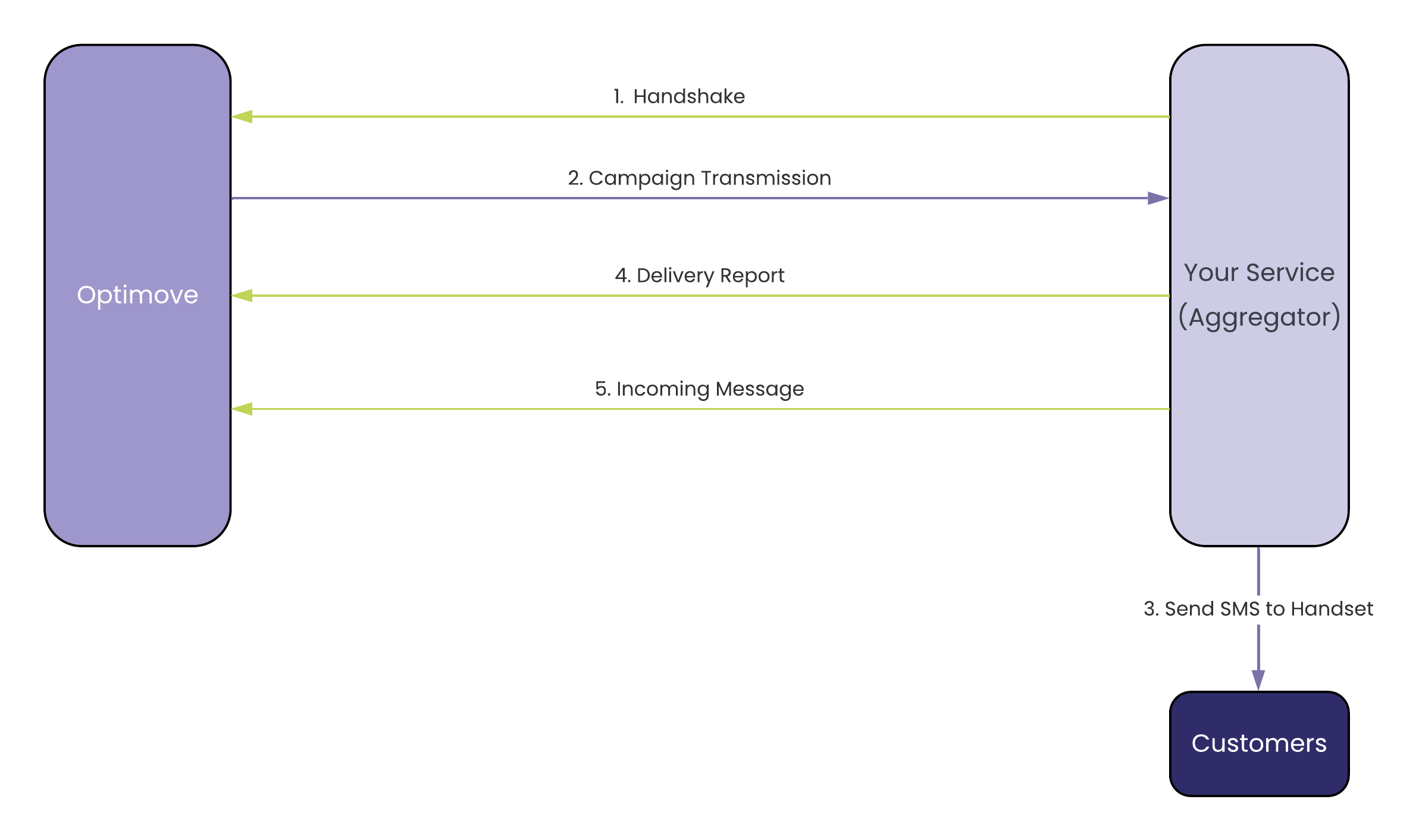
High-level sequence diagram of the SMS API integration flows.
Authentication and Security
All endpoints in this integration require strict authentication to ensure data integrity.
Required Headers
Every request — both the requests you send to Optimove and the campaign requests Optimove sends to your service — must include the headers below. Note that the API key header name differs depending on the direction.
| Flow | Direction | API Key Header | Signature Header |
|---|---|---|---|
| Handshake | To Optimove | app-api-key | x-hub-signature |
| Delivery Report | To Optimove | app-api-key | x-hub-signature |
| Incoming Message | To Optimove | app-api-key | x-hub-signature |
| Campaign Transmission | To Aggregator | X-API-Key | x-hub-signature |
HMAC Signature Generation
The x-hub-signature header contains an HMAC-SHA256 signature of the request body, computed with the shared Secret Key provided during configuration. The format follows the GitHub webhook signature format: sha256=<signature>.
const crypto = require("crypto");

const payload = JSON.stringify(requestBody);
const secret = "<YOUR_SHARED_SECRET>";

const signature = crypto
  .createHmac("sha256", secret)
  .update(payload)
  .digest("hex");

const hubSignature = `sha256=${signature}`;import hashlib
import hmac
import json
payload = json.dumps(request_body, separators=(",", ":"))
secret = b"<YOUR_SHARED_SECRET>"
signature = hmac.new(secret, payload.encode(), hashlib.sha256).hexdigest()
hub_signature = f"sha256={signature}"Compute the HMAC over the raw request body and verify it with a constant-time comparison (for example,
hmac.compare_digestin Python) to prevent timing attacks. Reject any request with a missing or invalid signature.
Obtaining Credentials
Before initiating the API flows, obtain the credentials from the Optimove tenant:
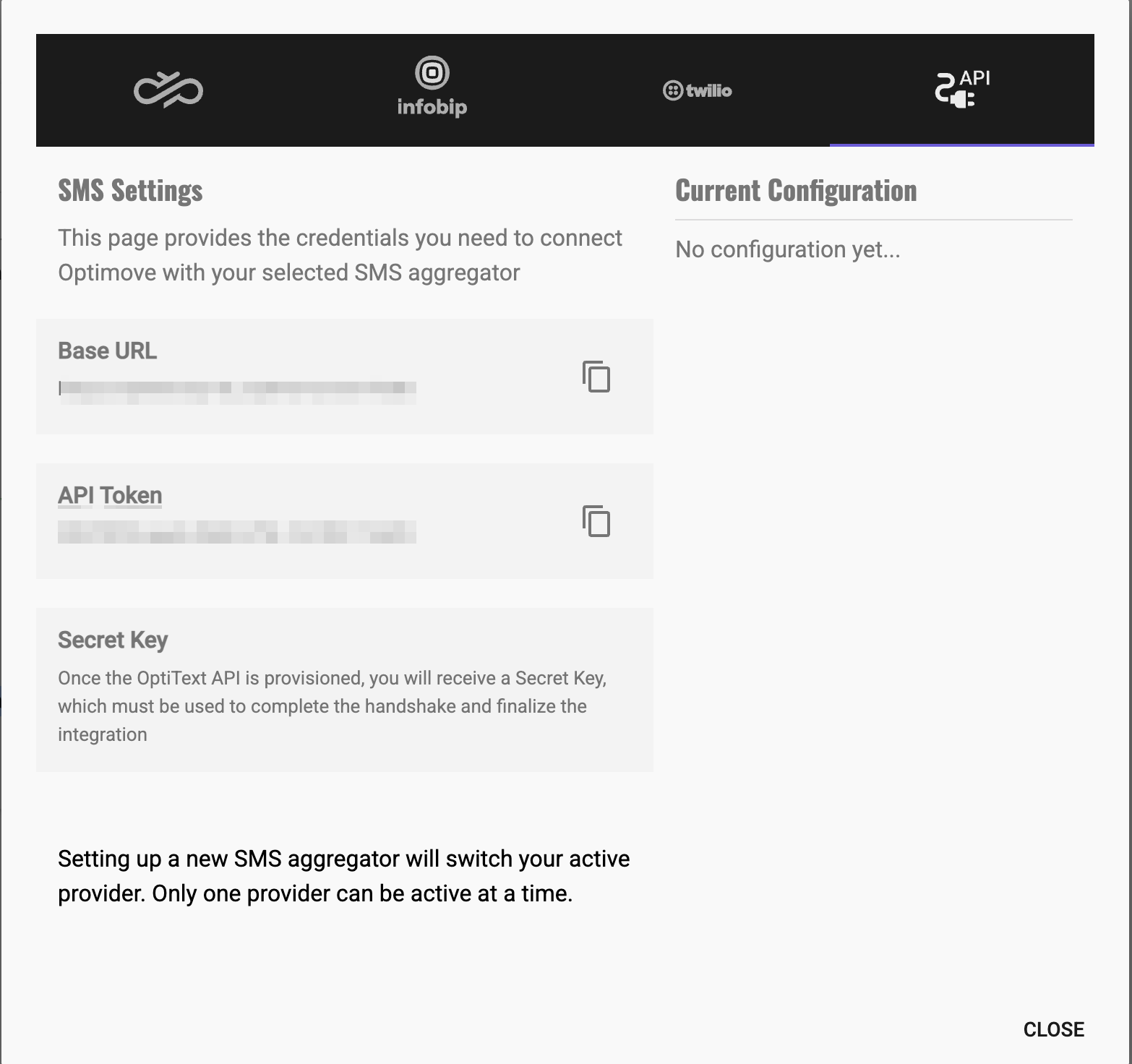
- In the Optimove interface, navigate to Settings > SMS > SMS Config.
- Select the API Vendor option (labeled SMS API Vendor in the UI).
- Once the feature is enabled, you will see the following read-only credentials:
- Base URL — the endpoint URL for SMS API calls (
<BASE_URL>). It includes a Base36-encoded identifier combining the tenant ID and application ID. - API Token — the unique token identifying the tenant. Sent as the
app-api-keyheader on requests to Optimove. - Secret Key — used for HMAC signature generation.
- Base URL — the endpoint URL for SMS API calls (
The Secret Key is only visible on this screen before the Handshake is completed. Once you successfully complete the Handshake (Flow 1), the Secret Key is hidden for security. Store it securely as soon as it is shown.
The Four Flows
- Flow 1 — Handshake (Aggregator → Optimove): A one-time setup call that connects your service to the tenant's SMS instance, registers your callback URL, and sets the default Sender ID. Campaigns cannot be sent until it succeeds.
- For request, response, and error details, see the Handshake Endpoint guide.
- Flow 2 — Campaign Transmission (Optimove → Aggregator): Optimove POSTs orchestrated campaign batches to the
campaignSendUrlyou registered during the handshake. Your service transmits them as SMS.- For the payload schema, authentication, and retry behavior, see the Campaign Transmission Webhook guide.
- Flow 3 — Delivery Report (Aggregator → Optimove): Report message delivery status so Optimove can track campaign success and handle failures.
- For the schema and status mapping, see the Delivery Report Endpoint guide.
- Flow 4 — Incoming Messages (Aggregator → Optimove): Forward end-customer replies (such as
STOP) back to Optimove.- For the schema, see the Incoming Messages Webhook guide.
Before going live, add Optimove's egress IP addresses to your firewall allowlist so Campaign Transmission traffic is accepted.
For the EU and US addresses, see the IP Allowlist reference.
Best Practices
Security & Authentication
- Validate signatures on every incoming request (Handshake, Transmission) using your shared Secret Key before processing the payload.
- Use a constant-time comparison function when verifying HMAC signatures to prevent timing attacks.
- Use HTTPS only for all endpoints — yours and Optimove's — to protect customer data and credentials in transit.
Timing & Retries
- Send delivery reports in real time as messages are processed. Don't batch them for long periods or delay while waiting for a "final" status when an intermediate one is available.
- Implement exponential backoff when retrying failed requests (network timeouts, 500-level errors).
- Do not retry 400-level errors (for example,
400 Bad Request,401 Unauthorized) — these indicate a permanent issue with the request format or credentials.
Data Integrity
- Preserve metadata: return the exact
metadataobject received in the Campaign Transmission payload when sending Delivery Reports, so Optimove can map status back to the correct tenant, campaign, and customer. - Match number formatting in reports exactly to the format received in the transmission payload.
Monitoring
- Alert on high rates of signature-verification failures or
401 Unauthorizedresponses, which can indicate configuration drift or a security issue. - Track the success rate of your delivery report submissions so campaign analytics in Optimove stay accurate.
For SMS channel concepts and the required customer profile attributes, see the Introduction to SMS guide.
Updated 3 months ago