
Trading Vertical
Our Vanilla Out-of-the-Box (OOTB) solution delivers a consistent data structure tailored for trading operations, so you can segment and personalize without building attributes from scratch. Below, you will find the input data the Trading vertical requires and the output attributes it creates in your Optimove instance.
What Data Should You Send?
The Trading vertical requires five input tables:
- Customers: trader profile details, such as age, country, and contact preferences.
- Transactions: deposits, withdrawals, and bonuses.
- Assets: the tradable instruments, such as currency pairs or commodities.
- Trade: trading activity.
- Positions: open and closed positions.
For the field-level schema, data types, and mandatory fields of each table, see the Trading guide.
What You Will See in Your Instance
Once your data is loaded, the following attributes are available in your Optimove instance, grouped by type.
Demographic Attributes
Profile details about each trader, used to segment and personalize by who the trader is. For example:
- A trading company uses the AGE attribute to segment traders into age groups and tailor educational content that increases engagement and retention.
Demographic Attributes
| Attribute Name | Description | Source Table |
|---|---|---|
| Address | The trader's address. | Customers |
| Age | The trader's age, calculated from Date of Birth. | Customers |
| City | The trader's city. | Customers |
| Country | The trader's country. | Customers |
| Currency | The trader's currency. | Customers |
| Date of Birth | The trader's date of birth. | Customers |
| The trader's email address. | Customers | |
| First Name | The trader's first name. | Customers |
| Gender | The trader's gender (Male, Female, or Unknown). | Customers |
| Language | The trader's language. | Customers |
| Last Login Date | The date of the trader's last login. | Customers |
| Last Name | The trader's last name. | Customers |
| Mobile Number | The trader's mobile number. | Customers |
| Referral Type | How the trader was referred to your site (for example, SEO, Affiliate, or Advertising). | Customers |
| Registered Platform | The platform the trader registered on (for example, Web, Android App, or iOS App). | Customers |
| Registration Date | The date the trader registered. | Customers |
| Account Currencies | The currencies of the trader's accounts, as a semicolon-separated list (for example, USD;EUR). | Customers |
| Account Types | The account types associated with the trader, as a semicolon-separated list (for example, CFD;Forex;Crypto). | Customers |
| Brand Name | The brand the trader belongs to, when you run multiple brands. | Customers |
| Customer ID | The trader's unique customer identifier. | Customers |
| KYC Stage | The trader's KYC (Know Your Customer) verification stage. | Customers |
| Number of Accounts, Lifetime | Total number of accounts associated with the trader. | Customers |
| Number of Demo Accounts, Lifetime | Number of demo (training) accounts linked to the trader. | Customers |
| Number of Live Accounts, Lifetime | Number of live trading accounts linked to the trader. | Customers |
| Total Balance | Total aggregated balance across all of the trader's accounts. | Customers |
Consent Attributes
Channel permissions and eligibility flags for each trader, all sourced from the Customers table. A kickoff meeting is held for each channel to make sure setup matches the channels you use. For example:
- A company uses the ALLOW_EMAIL attribute to send promotional emails only to traders who have explicitly opted in, supporting compliance with privacy regulations.
Consent Attributes
| Attribute Name | Description | Source Table |
|---|---|---|
| Allow Email | Whether promotional email may be sent to the trader (Yes/No). | Customers |
| Allow Push | Whether promotional push notifications may be sent to the trader (Yes/No). | Customers |
| Allow SMS | Whether promotional SMS messages may be sent to the trader (Yes/No). | Customers |
| Is Blocked* | Whether the trader is blocked, for example for fraud (Yes/No). | Customers |
| Is Email Verified | Whether the trader's email address is verified (Yes/No). | Customers |
| Is Optin | Whether the trader has opted in to at least one marketing channel (Yes/No). | Customers |
| Is SMS Verified | Whether the trader's mobile number is verified (Yes/No). | Customers |
| Is Test* | Whether the trader is a test customer (Yes/No). | Customers |
Please Note:
Is_OptInis a general consent indicator. It shows whether a trader has opted in to at least one channel. For example, a trader who opts in to email but not push hasAllow_Push= 'No',Allow_Email= 'Yes', andIs_OptIn= 'Yes'.Is Blocked and Is Test are not channel consent. Use them to exclude traders who should not receive marketing communications.
Please Note: Consent attributes are provided alongside your other customer data. Optimove reads the values you send, and you are responsible for managing the consent logic, rules, and maintenance.
Calculated Attributes
Calculated attributes track traders' financial and trading behavior from your Transactions, Trade, and Positions data. They are grouped into Frequency, Monetary, and Recency attributes and are calculated daily for Lifetime and, where listed, additional snapshot periods:
- Lifetime: Daily aggregated data over the trader's entire history.
- 2 Weeks: Daily aggregated data for the last two weeks.
- 1 Month: Daily aggregated data for the last month.
- 3 Months: Daily aggregated data for the last three months.
- 1 Year: Daily aggregated data for the last year.
For example:
- A company uses AVERAGE_DEPOSIT_AMOUNT to identify high-value traders who consistently deposit large amounts, and offers them personalized rewards or exclusive services.
Frequency Attributes
| Attribute Name | Description | Source Table | Snapshot Periods |
|---|---|---|---|
| Frequency, Last Three Months | Days between the first and last activity, divided by (number of activity days minus 1), in the last three months. | Transactions, Trade | 3 Months |
| Number of Bonus Granted, Lifetime* | Number of records in the Transactions table where STATUS is 'Approved' and TRANSACTION_TYPE is 'Bonus'. | Transactions | 1 Month |
| Number of Deposits, Lifetime* | Number of records in the Transactions table where STATUS is 'Approved' and TRANSACTION_TYPE is 'Deposit'. | Transactions | 2 Weeks |
| Number of Deposit Days, Lifetime* | Number of distinct TRANSACTION_DATE values in the Transactions table where STATUS is 'Approved' and TRANSACTION_TYPE is 'Deposit'. | Transactions | 2 Weeks |
| Number of Withdrawals, Lifetime* | Number of records in the Transactions table where STATUS is 'Approved' and TRANSACTION_TYPE is 'Withdrawal'. | Transactions | Lifetime |
| Number of Withdrawal Days, Lifetime* | Number of distinct TRANSACTION_DATE values in the Transactions table where STATUS is 'Approved' and TRANSACTION_TYPE is 'Withdrawal'. | Transactions | Lifetime |
| Number of Activity Days, Lifetime* | Number of days with any activity (deposits or trades), lifetime. | Transactions, Trade | Lifetime |
| Number of Buy Trades, Lifetime* | Number of trades of type Buy in the Trade table, lifetime. | Trade | Lifetime |
| Number of Currently Open Live Positions, Lifetime | Number of live positions the trader currently has open. | Positions | Lifetime |
| Number of Currently Open Positions, Lifetime | Number of positions the trader currently has open. | Positions | Lifetime |
| Number of Demo Trades, Lifetime* | Number of demo trades, lifetime. | Trade | Lifetime |
| Number of Live Trades, Lifetime* | Number of live trades, lifetime. | Trade | Lifetime |
| Number of Mobile Trades, Lifetime* | Number of trades made on mobile, lifetime. | Trade | Lifetime |
| Number of Positions Closed, Lifetime* | Number of positions the trader has closed, lifetime. | Trade | Lifetime |
| Number of Positions Opened, Lifetime* | Number of positions the trader has opened, lifetime. | Trade | Lifetime |
| Number of Position Opening Days, Lifetime* | Number of distinct days on which the trader opened a position, lifetime. | Trade | Lifetime |
| Number of Sell Trades, Lifetime* | Number of trades of type Sell in the Trade table, lifetime. | Trade | Lifetime |
| Number of Trades, Lifetime* | Number of trades, lifetime. | Trade | Lifetime |
| Number of Trade Days, Lifetime* | Number of distinct days on which the trader traded, lifetime. | Trade | 2 Weeks |
| Number of Web Trades, Lifetime* | Number of trades made on web, lifetime. | Trade | Lifetime |
| Favorite Asset Category | The asset category the trader trades most. | Trade, Assets | Lifetime, 3 Months |
| Frequency Categorical, Last Three Months | Categorical attribute based on Frequency, Last Three Months ('1 to 2 Days', '2 to 10 Days', 'Over 10 Days'). | Transactions, Trade | 3 Months |
| Deposit Activity Categorical, Last Two Weeks | Categorical attribute describing deposit activity in the last two weeks (for example, '2 or More Deposits', 'Up to 1 Deposit'). | Transactions | 2 Weeks |
Monetary Attributes
| Attribute Name | Description | Source Table | Snapshot Periods |
|---|---|---|---|
| Average Deposit Amount, Lifetime | Total Deposit Amount, Lifetime divided by Number of Deposits, Lifetime. | Transactions | Lifetime |
| Average Monthly Deposit Amount, Lifetime | The trader's average deposit amount per month, lifetime. | Transactions | Lifetime |
| Bonus Deposit Ratio, Lifetime | Total Bonus Granted Amount, Lifetime divided by Total Deposit Amount, Lifetime. | Transactions | Lifetime |
| Cashout Ratio, Lifetime | Total Withdrawal Amount, Lifetime divided by Total Deposit Amount, Lifetime. | Transactions | Lifetime |
| Average Daily Investment Amount, Lifetime | The trader's average investment amount per trade day. | Trade | 2 Weeks, 3 Months |
| Net Cash, Lifetime* | Total Deposit Amount, Lifetime minus Total Withdrawal Amount, Lifetime. | Transactions | 2 Weeks |
| Total Bonus Granted Amount, Lifetime* | Sum of TRANSACTION_AMOUNT in the Transactions table where STATUS is 'Approved' and TRANSACTION_TYPE is 'Bonus'. | Transactions | Lifetime |
| Total Deposit Amount, Lifetime* | Sum of TRANSACTION_AMOUNT in the Transactions table where STATUS is 'Approved' and TRANSACTION_TYPE is 'Deposit'. | Transactions | 2 Weeks |
| Total Withdrawal Amount, Lifetime* | Sum of TRANSACTION_AMOUNT in the Transactions table where STATUS is 'Approved' and TRANSACTION_TYPE is 'Withdrawal'. | Transactions | 2 Weeks |
| Customer Profit, Lifetime* | The trader's total profit (positive) or loss (negative), lifetime. | Trade | Lifetime |
| Net Revenue, Lifetime* | Total net revenue generated by the trader, lifetime. | Trade | 2 Weeks |
| Total Investment Amount, Lifetime* | Total amount the trader has invested, lifetime. | Trade | 2 Weeks |
| Total Investment Amount Mobile, Lifetime* | Total amount the trader has invested on mobile, lifetime. | Trade | Lifetime |
| Total Investment Amount Web, Lifetime* | Total amount the trader has invested on web, lifetime. | Trade | Lifetime |
Recency Attributes
| Attribute Name | Description | Source Table | Snapshot Periods |
|---|---|---|---|
| Days Since First Deposit | Days since the trader's first deposit. | Transactions | Lifetime |
| Days Since Last Deposit | Days since the trader's last deposit. | Transactions | Lifetime |
| Days Since Last Login | Days since the trader's last login. | Customers | Lifetime |
| Days Since Last Withdrawal | Days since the trader's last withdrawal. | Transactions | Lifetime |
| Days Since First Activity | Days since the trader's first activity. | Transactions, Trade | Lifetime |
| Days Since First Position Closed | Days since the trader first closed a position. | Trade | Lifetime |
| Days Since First Position Opened | Days since the trader first opened a position. | Trade | Lifetime |
| Days Since Last Activity | Days since the trader's last activity. | Transactions, Trade | Lifetime |
| Days Since Last Live Trade | Days since the trader's last live trade. | Trade | Lifetime |
| Days Since Last Position Closed | Days since the trader last closed a position. | Trade | Lifetime |
| Days Since Last Position Opened | Days since the trader last opened a position. | Trade | Lifetime |
| Days Since Last Trade | Days since the trader's last trade. | Trade | Lifetime |
| First Deposit Date* | First TRANSACTION_DATE in the Transactions table where STATUS is 'Approved' and TRANSACTION_TYPE is 'Deposit'. | Transactions | Lifetime |
| Last Deposit Date* | Last TRANSACTION_DATE in the Transactions table where STATUS is 'Approved' and TRANSACTION_TYPE is 'Deposit'. | Transactions | Lifetime |
| First Activity Date* | Date of the trader's first activity. | Transactions, Trade | Lifetime |
| First Position Close Date* | Date the trader first closed a position. | Trade | Lifetime |
| First Position Open Date* | Date the trader first opened a position. | Trade | Lifetime |
| Last Activity Date* | Date of the trader's last activity. | Transactions, Trade | Lifetime |
| Last Live Trade Date* | Date of the trader's last live trade. | Trade | Lifetime |
| Last Position Close Date* | Date the trader last closed a position. | Trade | Lifetime |
| Last Position Open Date* | Date the trader last opened a position. | Trade | Lifetime |
| Last Trade Date* | Date of the trader's last trade. | Trade | Lifetime |
| Time Since Last Activity | Categorical attribute based on Days Since Last Activity ('1 Day', '2 to 7 Days', 'More than 7 Days'). | Transactions, Trade | Lifetime |
| Time Since First Activity | Categorical attribute based on Days Since First Activity ('1 Day', '2 to 7 Days', 'More than 7 Days'). | Transactions, Trade | Lifetime |
| Time Since Registration | Categorical attribute based on Days Since Registration ('1 Day', '2 to 7 Days', '1 Week to 1 Month', '1 to 3 Months', 'More than 3 Months'). | Customers | Lifetime |
Note: Attributes marked with * are part of the Activity History feature.
Lifecycle Stage (LCS) Attributes
Attributes describing where each trader is in their lifecycle, how long they have been there, and how they got there. For example:
- A company uses the Lifecycle Stage Before Churn attribute to find previously valuable traders and target them with reactivation offers.
Lifecycle Stage (LCS) Attributes
| Attribute Name | Description | Source Table | Snapshot Periods |
|---|---|---|---|
| Days Since Registration | Days since the trader registered. | Customers | Lifetime |
| Days In Churn, Lifetime | Number of days the trader has spent in Churn. | Internal Tables | Lifetime |
| Days In Reactivated, Lifetime | Number of days the trader has spent in Reactivated. | Internal Tables | Lifetime |
| Days Since Last Reactivation | Days since the trader was last reactivated. | Internal Tables | Lifetime |
| Days Since Lifecycle Stage Change | Days since the trader moved to their current lifecycle stage. | Internal Tables | Lifetime |
| Lifecycle Stage Before Churn | The lifecycle stage the trader was in before churning. | Internal Tables | Lifetime |
| Number of Times Churned, Lifetime | Number of times the trader has churned. | Internal Tables | Lifetime |
| Previous Lifecycle Stage | The lifecycle stage the trader was in before moving to the current one. | Internal Tables | Lifetime |
| Reactivation Action | The activity that reactivated the trader after churning. | Internal Tables | Lifetime |
| Flex Deposit Activity Reactivated, Last Two Weeks | Categorical deposit activity for Reactivated traders in the last two weeks ('2 or More Deposits', '1 Deposit', 'No Recent Deposits'). | Internal Tables | 2 Weeks |
| Lifecycle Stage | The trader's current lifecycle stage. | Internal Tables | Lifetime |
| Time Since Last Activity Churn | Categorical attribute for churned traders based on Days Since Last Activity ('Up to 1 Month', '1 to 3 Months', '3 to 6 Months', 'More than 6 Months'). | Internal Tables | Lifetime |
| Dormant Type | Categorical attribute that distinguishes between depositor and non-depositor dormant traders. | Internal Tables | Lifetime |
| Investment Amount Percentile By LCS | Categorical attribute that divides traders into percentiles within their lifecycle stage based on investment amount. | Internal Tables | Lifetime, 2 Weeks, 3 Months |
| Deposit Percentile By Lifecycle Stage | Categorical attribute that divides traders into percentiles within their lifecycle stage based on deposit amount. | Internal Tables | Lifetime, 2 Weeks, 3 Months |
Product Attributes – Purchase History
Attributes of the assets a trader has traded, available for segmentation by product. For example:
- A brokerage uses the ASSET_CATEGORY attribute to identify traders who prefer cryptocurrencies and sends them targeted market analysis and news.
Product Attributes – Purchase History
| Attribute Name | Description | Source Table |
|---|---|---|
| Asset Category | Asset category from the Assets table. | Product History |
| Asset Name | Asset name from the Assets table. | Product History |
Out-of-the-box Campaign KPIs
Out-of-the-box (OOTB) Campaign KPIs measure the impact of your campaigns by comparing targeted trader groups against a control group:
- Number of Deposits: Tracks deposit frequency, showing whether a campaign encourages financial commitment.
- Deposit Amount: Sums the deposits made by traders, showing a campaign's effect on financial activity.
- Number of Trades: Counts trades, showing a campaign's impact on trading engagement.
- Total Investment Amount: Measures the total amount invested, showing a campaign's influence on trading volume.
- Net Revenue: Calculates net revenue from trading activity, showing campaign profitability.
Understanding Your Traders: Grouping and Predicting Behavior (Segmentation Model)
To help you connect with your traders in the best way, Optimove organizes them into groups based on their actions, such as how long it's been since they last traded, how much they deposit, or how much they invest. This is called Segmentation. Optimove also uses these groups to predict what traders might do next, such as whether they'll keep trading or become inactive.
Trader Groups: Organizing Traders by Their Journey
Optimove groups your traders by where they are in their journey with your platform. These stages are called Lifecycle Stages (LCS), and each stage is broken down by different segmentation layers.
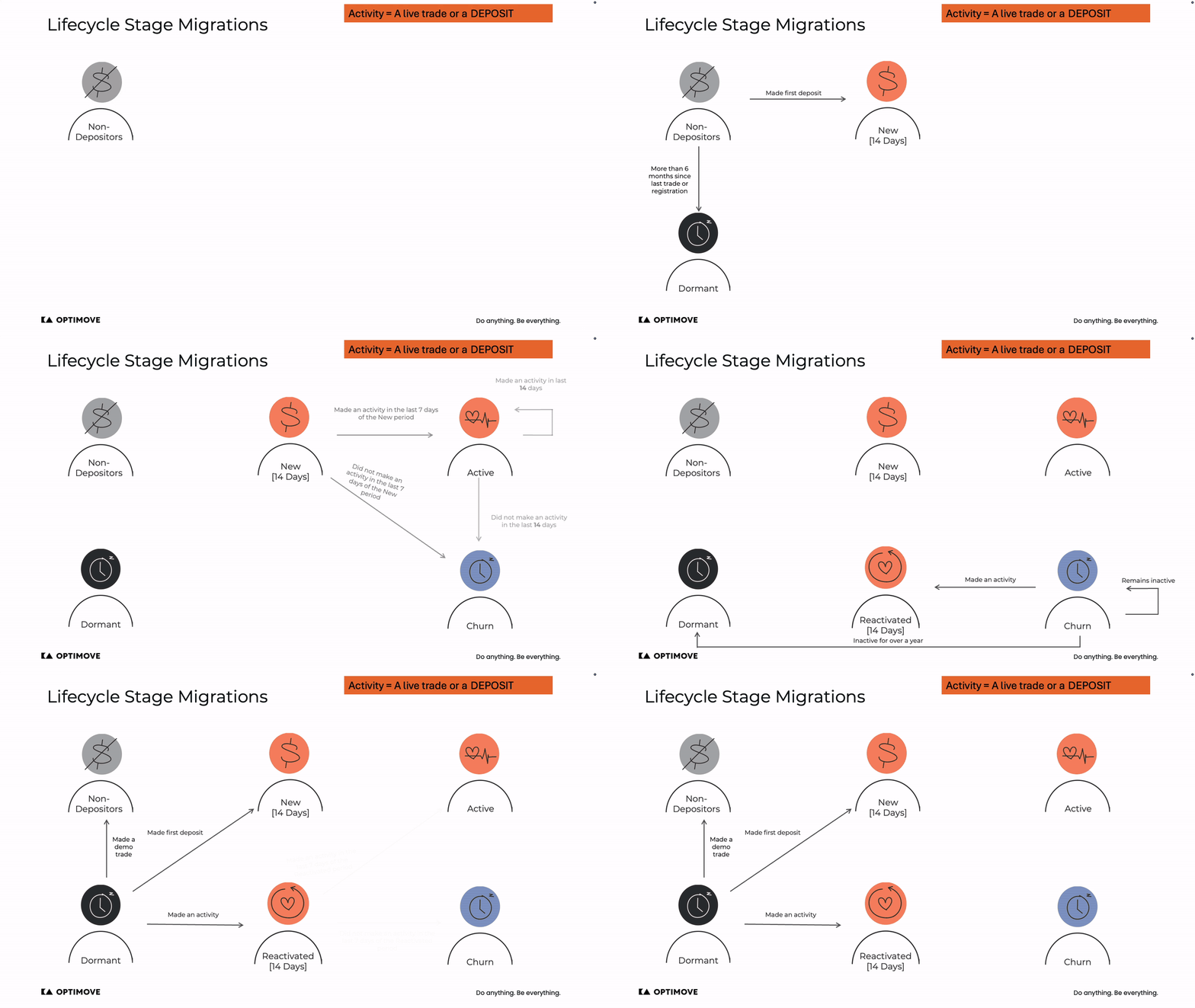
Here's how traders are grouped at each stage:
1. Non-Depositors: Traders Who Registered but Haven't Deposited
These traders have signed up for your platform but haven't added money to their account yet. We group them by how long it's been since they joined.
| Segmentation Layer | Details |
|---|---|
| Time Since Registration | 1 Day, 2 to 7 Days, 1 Week to 1 Month, 1 to 3 Months, More than 3 Months |
Example: A trader who registered yesterday but hasn't deposited could receive a "Get Started Trading" email with a platform guide to encourage their first deposit.
2. New: Just Started Depositing and Trading
These traders recently made their first deposit and started trading. We group them by investment amount, deposit activity, and time since their first and last activity.
| Segmentation Layer | Details |
|---|---|
| Investment Amount Percentile Last 2 Weeks | Top 10 Percent Trade Amount, 10 to 50 Percent Trade Amount, Bottom 50 Percent Trade Amount |
| Deposit Activity Last 2 Weeks | 2 or More Deposits, Up to 1 Deposit |
| Time Since First Activity | 1 Day, 2 to 7 Days, More than 7 Days |
| Time Since Last Activity | 1 Day, 2 to 7 Days, More than 7 Days |
Example: A new trader in the bottom 50% for investment amount might receive a push notification linking to a webinar on basic trading strategies.
3. Active: Regular Traders
These traders regularly log in and trade. We group them by recent activity, deposit and investment amount in the last 3 months, and how often they trade.
| Segmentation Layer | Details |
|---|---|
| Time Since Last Activity | 1 Day, 2 to 7 Days, 8 to 14 Days, More than 14 Days |
| Deposit Percentile Last 3 Months | Top 10 Percent Total Deposit Amount, 10 to 50 Percent Total Deposit Amount, Bottom 50 Percent Total Deposit Amount |
| Frequency Categorical Last 3 Months | 1 to 2 Days, 2 to 10 Days, Over 10 Days |
| Investment Amount Percentile Last 3 Months | Top 10 Percent Trade Amount, 10 to 50 Percent Trade Amount, Bottom 50 Percent Trade Amount |
Example: An active trader in the top 10% for deposits might get an email inviting them to an exclusive Q&A with a market analyst.
4. Churn: Stopped Trading
These traders haven't logged in or traded in a while. We group them by time since their last activity, past deposit and investment amounts, and the stage they were in before they stopped.
| Segmentation Layer | Details |
|---|---|
| Time Since Last Activity | Up to 1 Month, 1 to 3 Months, 3 to 6 Months, More than 6 Months |
| Deposit Percentile | Top 10 Percent Total Deposit Amount, 10 to 50 Percent Total Deposit Amount, Bottom 50 Percent Total Deposit Amount |
| Investment Amount Percentile | Top 10 Percent Trade Amount, 10 to 50 Percent Trade Amount, Bottom 50 Percent Trade Amount |
| LCS Before Churn | New, Active, Reactivated |
Example: A churned trader who was previously a top depositor and hasn't been active in two months might receive a "Market Opportunities You're Missing" email with a bonus on their next deposit.
5. Reactivated: Came Back After a Break
These traders stopped trading for a while but recently returned. We group them by recent activity, deposits, and investment amount since coming back.
| Segmentation Layer | Details |
|---|---|
| Time Since Last Activity | 1 Day, 2 to 7 Days, More than 7 Days |
| Deposit Percentile By LCS | Top 10 Percent Total Deposit Amount, 10 to 50 Percent Total Deposit Amount, Bottom 50 Percent Total Deposit Amount |
| Investment Amount Percentile Last 2 Weeks | Top 10 Percent Trade Amount, 10 to 50 Percent Trade Amount, Bottom 50 Percent Trade Amount |
| Deposit Activity Last 2 Weeks | 2 or More Deposits, 1 Deposit, No Recent Deposits |
Example: A reactivated trader who deposited three days ago might get a push notification with a "Welcome Back" bonus to encourage their next trade.
6. Dormant: Inactive for a Long Time
These traders haven't been active in a very long time, whether they've deposited before or only signed up. We group them by whether they have ever deposited.
| Segmentation Layer | Details |
|---|---|
| Dormant Type | Depositor, Non-Depositor |
Example: A dormant trader who previously deposited might get an email about a major market event, such as an interest rate decision, with a special offer to start trading again.
Please note that the out-of-the-box customer model excludes traders who haven't been active or registered for over 3 years.
Why This Matters for the Trading Vertical
By grouping your traders and predicting their behavior, you can create personalized experiences, whether that means offering a trading guide to a new trader, rewarding a loyal trader with exclusive market insights, or winning back someone who has been inactive.
Want to learn more? Check out this guide: The Optimove Model.
Updated 24 minutes ago