
Connect your AI platform to the Optimove MCP
Connecting your own AI platform
Use this guide to connect an in-house assistant, orchestrator, or agent platform to the Optimove MCP. If you use a supported client such as Claude or ChatGPT, follow the Optimove MCP Connector guide instead.
Before you start
Send your Optimove Customer Success Manager your callback URL, the https address where your platform receives the sign-in result. Optimove adds your callback domain to its list of trusted domains.
Connect your platform
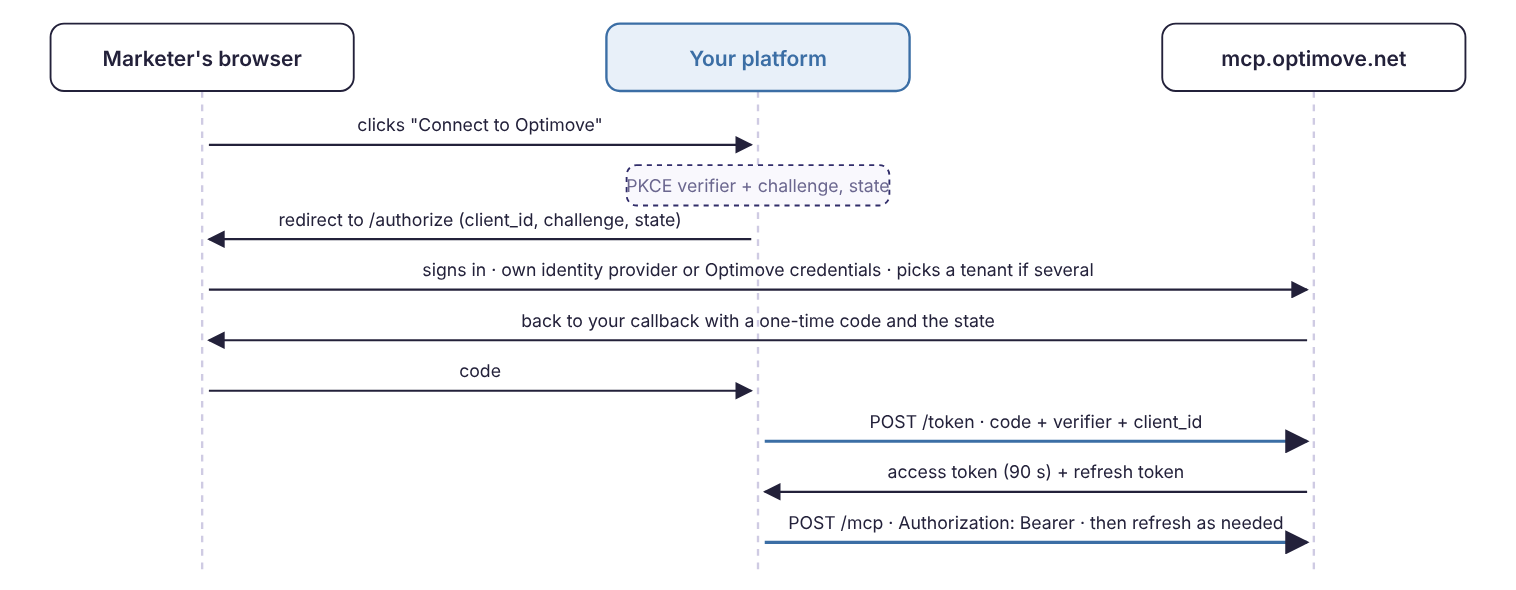
The connection is the same for every platform: you register once, send the user to sign in, redeem the code you receive, and call the MCP with the access token.
- Register once. Send your platform name and callback URL to
https://mcp.optimove.net/register. Keep the returnedclient_id(valid for one year). There is no client secret. - Start the sign-in. Create a PKCE verifier, its S256 challenge and a random
state, then open/authorizein the user's browser. - Receive the code. The browser returns to your callback with
codeand yourstate, or witherroranderror_description(see Errors). The code is valid for 120 seconds and works once. - Redeem the code. Send one
POST /tokenwith the code, your verifier, the same redirect URI and yourclient_id. You receive an access token and a refresh token. - Call tools. Send
initialize,tools/list, thentools/callwith the access token as a bearer token. - Refresh and sign out. Refresh on the first
401or before the access token expires. When the user disconnects, call/revoke.
Code examples
# 1 · register once
POST https://mcp.optimove.net/register
Content-Type: application/json

{"client_name": "Your Platform",
 "redirect_uris": ["https://ai.yourcompany.example/oauth/optimove/callback"],
 "grant_types": ["authorization_code", "refresh_token"],
 "response_types": ["code"],
 "token_endpoint_auth_method": "none"}

→ 201  {"client_id": "gAAAAAB…", "client_id_issued_at": 1793…, "redirect_uris": [...], ...}

# 2 · open in the user's browser
https://mcp.optimove.net/authorize?response_type=code
  &client_id=gAAAAAB…
  &redirect_uri=https%3A%2F%2Fai.yourcompany.example%2Foauth%2Foptimove%2Fcallback
  &code_challenge=<base64url(sha256(verifier))>&code_challenge_method=S256
  &state=<random>&resource=https%3A%2F%2Fmcp.optimove.net%2Fmcp

# 3 · the browser lands on your callback
GET https://ai.yourcompany.example/oauth/optimove/callback?code=gAAAAAB…&state=<random>

# 4 · redeem
POST https://mcp.optimove.net/token
Content-Type: application/x-www-form-urlencoded

grant_type=authorization_code&code=gAAAAAB…&code_verifier=<verifier>
  &redirect_uri=https%3A%2F%2Fai.yourcompany.example%2Foauth%2Foptimove%2Fcallback&client_id=gAAAAAB…

→ 200  {"access_token": "gAAAAAB…", "refresh_token": "gAAAAAB…", "token_type": "Bearer", "expires_in": 90}

# 5 · call
POST https://mcp.optimove.net/mcp
Authorization: Bearer gAAAAAB…
Accept: application/json, text/event-stream
MCP-Protocol-Version: 2025-06-18
Content-Type: application/json

{"jsonrpc":"2.0","id":"1","method":"tools/list","params":{}}
// Node 18+, built-in fetch and crypto. Same steps as the HTTP walkthrough.
// CLIENT_ID is the one returned by step 1 (register).
import { randomBytes, createHash } from "node:crypto";
const BASE = "https://mcp.optimove.net";
const CALLBACK = "https://ai.yourcompany.example/oauth/optimove/callback";
const CLIENT_ID = "<your client_id>";
// Step 2: start sign-in. Open the returned URL in the person's browser.
export function startSignIn(session) {
session.verifier = randomBytes(32).toString("base64url");
session.state = randomBytes(16).toString("base64url");
const url = new URL(`${BASE}/authorize`);
url.search = new URLSearchParams({
response_type: "code", client_id: CLIENT_ID, redirect_uri: CALLBACK,
code_challenge: createHash("sha256").update(session.verifier).digest("base64url"),
code_challenge_method: "S256", state: session.state, resource: `${BASE}/mcp`,
});
return url.toString();
}
// Steps 3-4: your callback receives ?code=…&state=… (or ?error=…)
export async function finishSignIn(session, query) {
if (query.state !== session.state) throw new Error("state mismatch");
if (query.error) throw new Error(`${query.error}: ${query.error_description}`);
session.tokens = await token({
grant_type: "authorization_code", code: query.code,
code_verifier: session.verifier, redirect_uri: CALLBACK, client_id: CLIENT_ID,
});
}
async function token(form) {
const res = await fetch(`${BASE}/token`, {
method: "POST",
headers: { "Content-Type": "application/x-www-form-urlencoded" },
body: new URLSearchParams(form),
});
// A 503 is not a sign-out: wait Retry-After seconds and retry with the same refresh token.
if (!res.ok) throw Object.assign(new Error(`token ${res.status}`), { status: res.status, retryAfter: res.headers.get("Retry-After") });
const t = await res.json();
return { ...t, expiresAt: Date.now() + t.expires_in * 1000 };
}
// Access tokens live 90 seconds. Refresh shortly before, one refresh at a time per session.
export async function accessToken(session) {
if (Date.now() < session.tokens.expiresAt - 10_000) return session.tokens.access_token;
session.refreshing ??= token({
grant_type: "refresh_token", refresh_token: session.tokens.refresh_token, client_id: CLIENT_ID,
}).finally(() => { session.refreshing = undefined; });
session.tokens = await session.refreshing;
return session.tokens.access_token;
}
// Step 5: call the MCP endpoint (JSON-RPC 2.0 over Streamable HTTP)
let nextId = 1;
export async function mcp(session, method, params = {}) {
const res = await fetch(`${BASE}/mcp`, {
method: "POST",
headers: {
Authorization: `Bearer ${await accessToken(session)}`,
"Content-Type": "application/json",
Accept: "application/json, text/event-stream",
"MCP-Protocol-Version": "2025-06-18",
},
body: JSON.stringify({ jsonrpc: "2.0", id: String(nextId++), method, params }),
});
if (!res.ok) throw new Error(`mcp ${res.status}: ${await res.text()}`);
const text = await res.text();
// A streamed reply carries the JSON-RPC message on its last "data:" line.
const json = res.headers.get("content-type")?.includes("text/event-stream")
? text.split("\n").filter((l) => l.startsWith("data:")).pop().slice(5)
: text;
return JSON.parse(json);
}
// await mcp(session, "initialize", { protocolVersion: "2025-06-18", capabilities: {}, clientInfo: { name: "your-platform", version: "1" } });
// await mcp(session, "tools/call", { name: "explorer", arguments: { focus: "tenant" } });# pip install mcp
from mcp.client.auth import OAuthClientProvider, TokenStorage
from mcp.client.streamable_http import streamablehttp_client
from mcp.client.session import ClientSession
from mcp.shared.auth import OAuthClientMetadata
metadata = OAuthClientMetadata(
client_name="Your Platform",
redirect_uris=["https://ai.yourcompany.example/oauth/optimove/callback"],
grant_types=["authorization_code", "refresh_token"],
response_types=["code"],
token_endpoint_auth_method="none",
)
auth = OAuthClientProvider(
server_url="https://mcp.optimove.net/mcp",
client_metadata=metadata,
storage=YourTokenStorage(session_id), # implements TokenStorage: get/set tokens and client info
redirect_handler=open_in_users_browser, # async (url) -> None
callback_handler=wait_for_your_callback, # async () -> (code, state)
)
async with streamablehttp_client("https://mcp.optimove.net/mcp", auth=auth) as (read, write, _):
async with ClientSession(read, write) as session:
await session.initialize()
tools = await session.list_tools()
result = await session.call_tool("explorer", {"focus": "tenant"})// npm install @modelcontextprotocol/client
import {
Client, StreamableHTTPClientTransport, UnauthorizedError,
type OAuthClientProvider, type OAuthClientMetadata, type OAuthClientInformationMixed,
type OAuthClientInformationContext, type OAuthTokens, type OAuthDiscoveryState,
} from "@modelcontextprotocol/client";
const MCP_URL = new URL("https://mcp.optimove.net/mcp");
const CALLBACK = "https://ai.yourcompany.example/oauth/optimove/callback";
// One provider per signed-in person. Persist what it stores so a restart doesn't mean a new sign-in.
class OptimoveAuth implements OAuthClientProvider {
private clients = new Map<string, OAuthClientInformationMixed>();
private saved?: OAuthTokens;
private verifier?: string;
private discovery?: OAuthDiscoveryState;
lastState?: string;
readonly redirectUrl = CALLBACK;
readonly clientMetadata: OAuthClientMetadata = {
client_name: "Your Platform",
redirect_uris: [CALLBACK],
grant_types: ["authorization_code", "refresh_token"],
response_types: ["code"],
token_endpoint_auth_method: "none",
};
clientInformation(ctx?: OAuthClientInformationContext) { return ctx ? this.clients.get(ctx.issuer) : undefined; }
saveClientInformation(info: OAuthClientInformationMixed, ctx?: OAuthClientInformationContext) { if (ctx) this.clients.set(ctx.issuer, info); }
tokens() { return this.saved; }
saveTokens(tokens: OAuthTokens) { this.saved = tokens; }
state() { this.lastState = crypto.randomUUID(); return this.lastState; }
saveDiscoveryState(s: OAuthDiscoveryState) { this.discovery = s; }
discoveryState() { return this.discovery; }
redirectToAuthorization(url: URL) { openInUsersBrowser(url); }
saveCodeVerifier(v: string) { this.verifier = v; }
codeVerifier() { if (!this.verifier) throw new Error("no code verifier"); return this.verifier; }
}
const auth = new OptimoveAuth();
const client = new Client({ name: "your-platform", version: "1.0.0" });
const transport = new StreamableHTTPClientTransport(MCP_URL, { authProvider: auth });
try {
await client.connect(transport); // first time: registers, sends the person to sign in, throws
} catch (e) {
if (!(e instanceof UnauthorizedError)) throw e;
const params = new URL(await waitForYourCallback()).searchParams;
if (params.get("state") !== auth.lastState) throw new Error("state mismatch");
await transport.finishAuth(params); // redeems the code and saves the tokens
await client.connect(new StreamableHTTPClientTransport(MCP_URL, { authProvider: auth }));
}
const { tools } = await client.listTools();
const result = await client.callTool({ name: "explorer", arguments: { focus: "tenant" } });
// A refused call is ordinary content: its JSON text carries `error` and `failure_domain` (isError is not set).Use Optimove with Claude
Claude API (Anthropic SDK) with the MCP connector. Claude calls Optimove's tools directly. Sign the person in with any example above, then pass a freshly refreshed access token on every request. Anthropic’s servers use the access token during the request. Access tokens expire after 90 seconds, so refresh the token just before each call.
// npm install @anthropic-ai/sdk
import Anthropic from "@anthropic-ai/sdk";
const anthropic = new Anthropic();

const response = await anthropic.beta.messages.create({
  model: "claude-opus-5-5",
  max_tokens: 16000,
  betas: ["mcp-client-2025-11-20", "server-side-fallback-2026-07-01"],
  fallbacks: "default",
  mcp_servers: [{
    type: "url",
    url: "https://mcp.optimove.net/mcp",
    name: "optimove",
    authorization_token: await accessToken(session),
  }],
  tools: [{ type: "mcp_toolset", mcp_server_name: "optimove" }],
  messages: [{ role: "user", content: "Which Optimove account am I connected to?" }],
});
for (const block of response.content) if (block.type === "text") console.log(block.text);
# pip install anthropic
import anthropic
client = anthropic.Anthropic()
response = client.beta.messages.create(
model="claude-opus-5-5",
max_tokens=16000,
betas=["mcp-client-2025-11-20", "server-side-fallback-2026-07-01"],
fallbacks="default",
mcp_servers=[{
"type": "url",
"url": "https://mcp.optimove.net/mcp",
"name": "optimove",
"authorization_token": access_token, # refreshed just before this call
}],
tools=[{"type": "mcp_toolset", "mcp_server_name": "optimove"}],
messages=[{"role": "user", "content": "Which Optimove account am I connected to?"}],
)Claude Agent SDK. The Agent SDK doesn't run OAuth itself. Sign the person in with your own flow and pass the access token as a header. The header holds for the whole run, so start each run with a freshly refreshed token.
// npm install @anthropic-ai/claude-agent-sdk
import { query } from "@anthropic-ai/claude-agent-sdk";

for await (const message of query({
  prompt: "List my draft campaigns in Optimove",
  options: {
    mcpServers: {
      optimove: {
        type: "http",
        url: "https://mcp.optimove.net/mcp",
        headers: { Authorization: `Bearer ${await accessToken(session)}` },
      },
    },
    allowedTools: ["mcp__optimove__*"],
  },
})) {
  if (message.type === "result" && message.subtype === "success") console.log(message.result);
}
Tokens and sessions
| Token | Lifetime | Use it for |
|---|---|---|
| Authorization code | 120 seconds, single use | One POST /token with your PKCE verifier |
| Access token | 90 seconds | Authorization: Bearer on every MCP request. Refresh before it expires, or on the first 401 |
| Refresh token | Single use, until the session ends | One POST /token with grant_type=refresh_token. You receive a new pair and the old refresh token is spent |
Treat tokens as opaque strings and store the current refresh token with the session it belongs to.
# Refresh: every ~80 seconds, or on the first 401 from /mcp
POST https://mcp.optimove.net/token
Content-Type: application/x-www-form-urlencoded

grant_type=refresh_token&refresh_token=<current>&client_id=<yours>

# Sign out: revoking either token ends the whole session within 90 seconds
POST https://mcp.optimove.net/revoke
Content-Type: application/x-www-form-urlencoded

token=<access or refresh token>&client_id=<yours>
One refresh at a time. Serialise refreshes per session. Two concurrent refreshes with the same token look like a replay and end the session. If a reply is lost, retry immediately with the same token.
A 503 is not a sign-out. If/tokenreturns503with aRetry-Afterheader, wait and retry with the same refresh token. Do not send the person back to sign in.
Calling the MCP endpoint
The endpoint speaks JSON-RPC 2.0 over Streamable HTTP and is stateless, so you can retry freely. A response is a JSON body or a short text/event-stream; read the last data: line of a stream as the JSON-RPC message.
{"jsonrpc":"2.0","id":"1","method":"initialize",
 "params":{"protocolVersion":"2025-06-18","capabilities":{},"clientInfo":{"name":"your-platform","version":"1"}}}

{"jsonrpc":"2.0","id":"2","method":"tools/list","params":{}}

{"jsonrpc":"2.0","id":"3","method":"tools/call",
 "params":{"name":"explorer","arguments":{"focus":"tenant"}}}
A tool that refuses still answers with ordinary content: a JSON object with error, context, failure_domain and failure_detail. The JSON-RPC isError flag is not set, so read the body, not only the status.
For the tools, safety model, limits and data handling, see the Optimove MCP Connector reference.
Add mutual TLS (optional)
If you want to secure the connection further, Optimove can also require mutual TLS (mTLS) for your platform. The way you connect stays the same. Contact your Optimove Customer Success Manager to set it up.
Errors
Registration
Every answer is 400 with a JSON body of error and error_description.
| You receive | It means | Do |
|---|---|---|
400 invalid_redirect_uri — redirect_uri host not in allowlist: <uri> | The callback's domain is not admitted for self-registration, or the URL is not https. | Ask your Optimove contact to admit the domain. Use https. |
400 invalid_client_metadata — grant_types must be authorization_code and refresh_token | The registration asked for other grant types. | Register with exactly those two. |
400 invalid_client_metadata — response_types must include 'code' for authorization_code grant | The registration left out the code response type. | Send "response_types": ["code"]. |
Sign-in
A refused sign-in returns the browser to your callback with error and error_description query parameters, and shows the person an Optimove page that explains it in plain words. The description is the stable string; match on it, not on the page text.
| Your callback receives | It means | Do |
|---|---|---|
| The sign-in itself | ||
access_denied — Session expired (login_required) | The sign-in took too long, or the identity provider ended the attempt. | Start the sign-in again. |
<the identity provider's error> — with the identity provider's own description, passed on unchanged | The person's identity provider or Optimove's sign-in refused the attempt. The error is one of the OAuth codes, or server_error. | Show the description. Start again. |
server_error — Auth0 code exchange failed | Optimove's sign-in could not finish the exchange. | Start again. Tell us if it repeats. |
access_denied — id_token verification failed | The sign-in result could not be verified. | Start again. |
| Who the person is | ||
access_denied — Email domain not allowed: <domain> | This Optimove service admits only certain email domains, and the person's is not one. | Sign in with the work address Optimove knows. |
access_denied — No Optimove account linked to this SSO sign-in | The person signed in with their company's single sign-on, and no Optimove user is linked to that identity. | The tenant's Optimove administrator adds them as a user. |
access_denied — No Optimove account linked after re-login | Optimove offered a second sign-in with another identity, and that one has no Optimove user either. | The tenant's Optimove administrator adds them as a user. |
| The tenant the user picked | ||
invalid_request — tenant_id must be numeric, or access_denied — tenant_id <N> not in user allowlist | The tenant choice did not match the tenants this user may use. The tenant picker page was stale or altered. | Start the sign-in again. |
access_denied — opti-auth-service token exchange failed | Optimove's authentication service refused the user for the chosen tenant: they have no access to it, or the sign-in expired. | Check the user's access to that tenant. Start again. |
server_error — No JWT in opti-auth-service response | A fault on Optimove's side. | Start again. Tell us if it repeats. |
temporarily_unavailable — feature-flag sources unreachable | Optimove could not confirm the tenant's access just now. | Start again in a moment. |
access_denied — MCP not enabled for tenant <N> | The MCP is not switched on for that tenant. | The tenant's administrator asks their Optimove CSM. |
Token endpoint
Every answer has a JSON body of error and error_description.
| You receive | It means | Do |
|---|---|---|
| The client | ||
401 unauthorized_client — Invalid client_id, or Missing client_id | The client_id is not one Optimove issued, or a self-registration has passed its one-year life. | Register again and store the new id. |
400 invalid_request — Too many token requests. Please wait before retrying. | More than 20 token requests in a minute for one tenant from one client. | Back off. Serialise refreshes. |
503 — with a Retry-After header | A temporary fault on Optimove's side. The refresh token is still good. | Wait the Retry-After seconds and retry with the same refresh token. Do not sign the person out. |
| Redeeming the code | ||
400 invalid_grant — authorization code does not exist, or Authorization code not found | The code is wrong, or was already redeemed. | Start the sign-in again. |
400 invalid_grant — authorization code has expired | The code is older than 120 seconds. | Redeem it as soon as your callback receives it. Start again. |
400 invalid_grant — Authorization code not bound to this client | The code was issued to another client_id. | Redeem with the client id that started the sign-in. |
400 invalid_request — redirect_uri did not match the one used when creating auth code | The redirect_uri differs from the one sent to /authorize. | Send exactly the same URI. |
400 invalid_grant — incorrect code_verifier | The PKCE verifier does not match the challenge. | Send the verifier that belongs to this sign-in. |
400 invalid_grant — Could not complete sign-in. Please try connecting again. | Optimove could not finish the sign-in on its side. | Start the sign-in again. |
400 invalid_grant — This sign-in was already completed. Please try connecting again. | The code was redeemed already. A retry within a few seconds receives the same tokens; a later one does not. | Use the tokens from the first redemption. |
| Refreshing | ||
400 invalid_grant — Invalid refresh token | Not a refresh token Optimove issued to this client. | Sign the person in again. |
400 invalid_grant — Refresh token not bound to this client | The refresh token belongs to another client id. | Refresh with the client id the session belongs to. |
400 invalid_grant — Refresh token has already been used. Please re-authenticate. | This refresh token was spent, and presenting it again ended the session. The usual cause is two refreshes in flight at once. | Sign the person in again, then keep one refresh in flight per session. |
400 invalid_grant — refresh token has expired | The session has reached its end. | Sign the person in again. |
400 invalid_grant — Session has been revoked. Please re-authenticate. | The session was revoked, by a sign-out or by Optimove. | Sign the person in again. |
400 invalid_grant — MCP access has been revoked for this tenant. Please re-authenticate. | The MCP was switched off for the session's tenant. | The tenant's administrator asks their Optimove CSM. |
400 invalid_grant — Token refresh failed: <detail> | The person's Optimove session could not be renewed. | Sign the person in again. |
MCP endpoint
These refuse the request before any tool runs. A tool that runs and refuses answers with an ordinary result instead; see Calling the MCP endpoint.
| You receive | It means | Do |
|---|---|---|
401 invalid_token — Authentication required (WWW-Authenticate: Bearer error="invalid_token") | No token, or the access token is past its 90 seconds, or the session was revoked. | Refresh once. If the refresh fails, sign the person in again. |
Updated about 6 hours ago