
Batch Data Overview
Batch data gives Optimove the full picture of every customer: their profile, their history and their transactions. Segmentation, targeting, analytics and predictive models all run on it. There's more than one way to get it in, and Optimove helps you choose the one that gets your data live fastest.
Where your daily data comes from
Powered by your source systems
Provide data through recurring batch feeds from your source systems, keeping your data in Optimove aligned with your system of record.
Powered by your real-time events
Provide data through real-time events that Optimove aggregates daily, eliminating the need for recurring batch feeds. Historical data can be imported through a one-time batch load.
Event-Based Aggregation →
Ways to onboard batch data
| Self-service (recommended) | Optimove-managed | |
|---|---|---|
| How it works | You load, map and check your data yourself in your Onboarding Hub, then start the upload. | You deliver your data, and Optimove runs QA with you and loads it. |
| QA | Automated checks in your Onboarding Hub | Review rounds with Optimove |
| Availability | Currently available for data delivered as files over SFTP | Available for all supported delivery methods |
Optimove will confirm which one fits your data.
Before you start
Using Event-Based Aggregation? Follow the Event-Based Aggregation steps instead.
For self-service and Optimove-managed onboarding, the groundwork is the same:
-
Review the data schema for your vertical
Optimove will point you to the right one, or see Recommended Data Schemas. The schemas show the best structure for Optimove, but if your data is structured differently, Optimove can adapt to it. Extra data that improves segmentation is welcome, and can be added through a custom data request.
-
Choose a delivery method
Secure data sharing (Snowflake or Iceberg), cloud storage (AWS S3, Google Cloud Storage or Azure Blob), SFTP, a direct database connection, or an API connection for supported third-party platforms. See Batch Data Delivery Methods.
-
Prepare your data
Get your data into the agreed structure and format. The Data QA checklist helps you avoid most issues.
Self-service: onboard your batch data in your Onboarding Hub (recommended)
Wherever it's supported, self-service is the way we recommend onboarding your batch data. It isn't about doing the work on your own. It's about removing the waiting between steps, with Optimove's experts there whenever you want them.
- Reach value sooner. Automated QA gives you results as soon as you run it, so you fix issues as you go instead of over several review rounds.
- Own your data setup. You make the mapping, validation and configuration decisions yourself, and come away understanding exactly how Optimove uses your data.
- Keep moving, with experts on hand. Your progress never waits on a handoff, and support is there whenever you need it.
-
Upload Data
Bring your data into the Onboarding Hub.
-
Map Your Data to Optimove Schema
Match your tables and fields to the schema for your vertical.
-
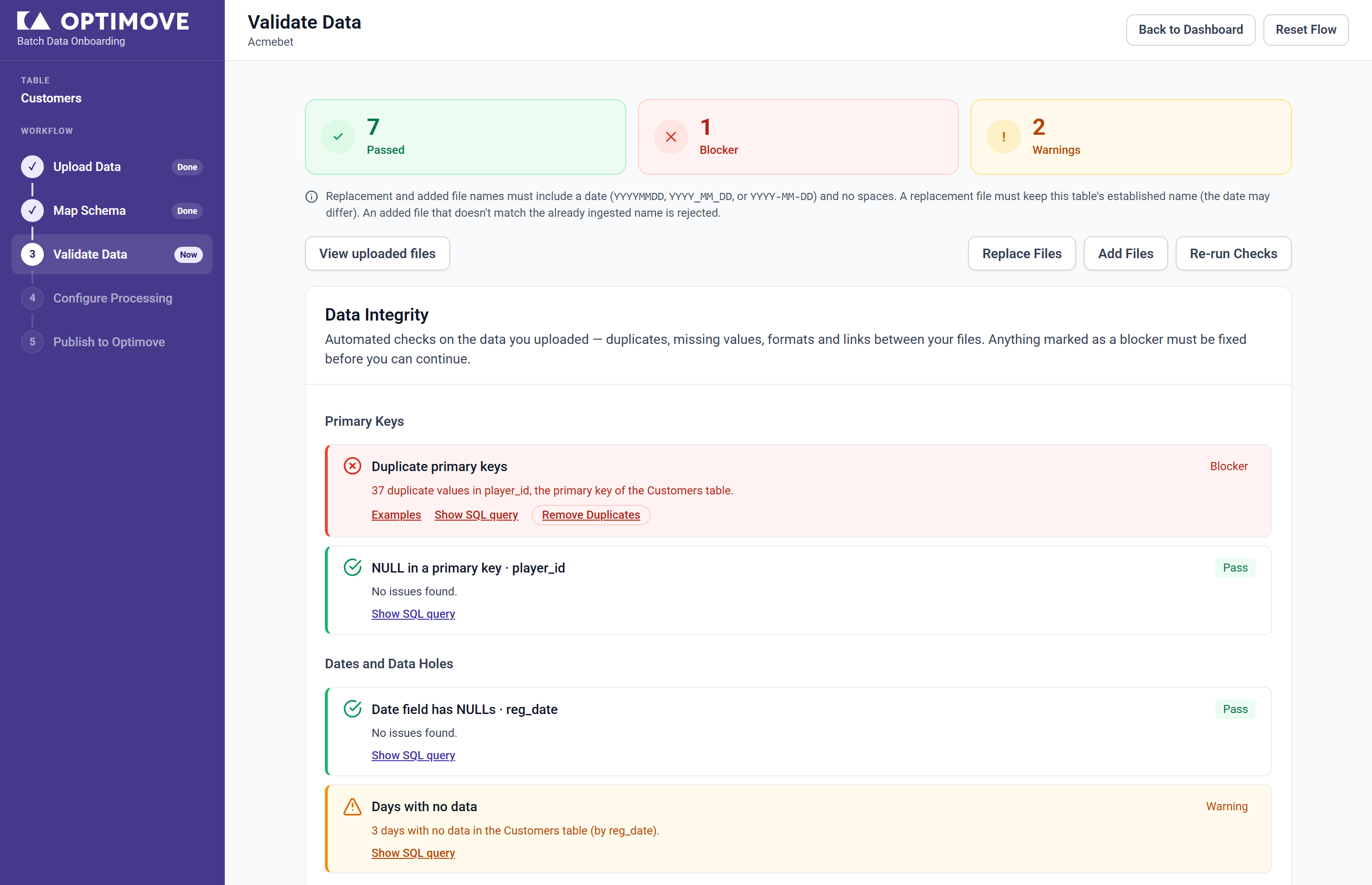
Validate and Approve QA Results
Automated checks show you exactly what to fix. Fix and rerun until every check passes. The Data QA checklist helps you get there faster.
-
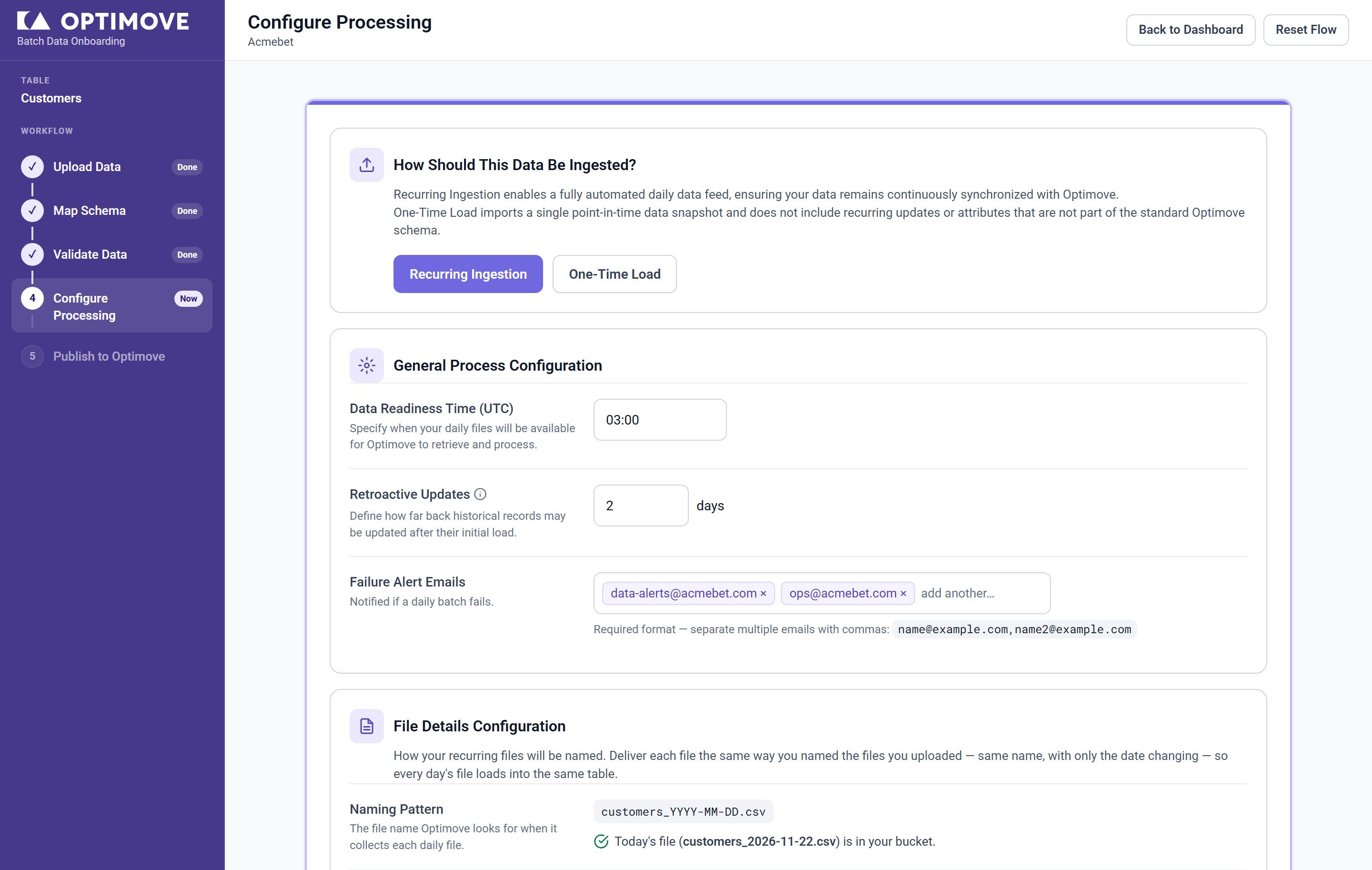
Configure Automated Processing
Set up how your data updates each day, including your daily data readiness time, and start the upload. Your data is loaded automatically and daily updates begin. Your customer attributes are available as soon as the Customers table is loaded, and your predictive models, reports and KPIs are populated once the rest of your tables are in. From then on, keep your daily data coming in the agreed structure. See Batch Data Update.
Optimove-managed: Optimove loads and validates it with you
Optimove's data team runs QA with you, configures your ETL and loads your data. Your part is delivering the data and resolving feedback.
-
Deliver your data
Share your data with Optimove through the delivery method you chose. You start with the Customers table, then move on to the rest of your tables, including your historical data.
-
Data QA
Optimove checks your delivery for format, alignment between tables, completeness and business logic. You'll get a detailed report, fix what's needed and redeliver. Expect a few rounds. See Data QA.
-
Data load
Once QA is finalized, Optimove builds your daily pipeline from the ETL details you provide, including your daily data readiness time. It then maps your data to your vertical and loads it, in two stages. The Customers table comes first and gives you your customer attributes right away. Once the rest of your tables are loaded, your predictive models, reports and KPIs are populated too. See What You Get Out of the Box.
-
Daily updates
Automate your daily delivery. Once your daily updates are live, the pipeline runs every day with built-in checks and alerts. See Batch Data Update.
Event-Based Aggregation: Optimove builds your batch data from your events
-
Send OOTB events
Use your real-time integration (SDK or server-side) to send standard OOTB events. See Real-Time Data Onboarding.
-
Add historical data (optional)
You can add your history through a one-time batch load. See Loading historical data.
-
Data QA
Your events are aggregated into daily batch data and validated, along with any historical data. Without historical data, QA runs once enough events have built up over a few days, or on test events your team generates.
-
Data load
Once QA is complete, your daily aggregation is set up, and your data is mapped to your vertical and loaded. Your customer attributes, predictive models, reports and KPIs are populated from it.
-
Daily updates
Your daily updates aggregate your events into batch data, with no recurring batch feed to maintain.
See Event-Based Aggregation for requirements and the events each vertical needs.
Updated about 6 hours ago